
Stack bins over tools taller than their pocket
Use Raise Lip so a bin stacked on top clears a tool that sticks up out of its pocket, and work out how many units it needs.
A tool thicker than its pocket sticks out of the top of the bin. Stack another bin on top and it comes down on the tool. A stacked bin rests on the flat top face of the bin below. The stacking lip only holds it in place.
Raise Lip builds the walls and stacking lip higher in 7 mm steps and leaves the inside open. The bin on top sits higher and clears the tool.
1. Work out how far it sticks out
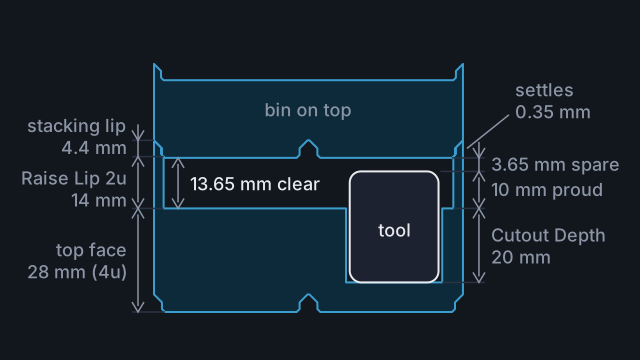
The top face is the flat surface the pockets are cut into. It sits 7 mm up for each unit of Height, so 28 mm up in a 4u bin.
Measure the tool at its thickest point, lying the way it sits in the bin. Take away the pocket depth: Cutout Depth in the sidebar, or the Depth you gave that tool in the bin editor toolbar. Locking pliers 30 mm thick in a 20 mm pocket stick out 10 mm.
A pocket can go down to 6.75 mm above the bottom of the bin, which keeps the base and a 2 mm floor. So Cutout Depth goes up to 21.25 mm in a 4u bin. To bury the tool in a deeper pocket instead, see make the pocket deep enough. Raise Lip is for a tool you would rather leave sticking out, where you can grab it.
2. Set Raise Lip
Keep Stacking lip on and Raise Lip appears under it, from 0 to 10u. Each unit adds 7 mm of wall. The bin on top settles 0.35 mm into the raised wall, so the clear space is 7 mm per unit, less 0.35 mm.
| Raise Lip | Clear space above the top face |
|---|---|
| 1u | 6.65 mm |
| 2u | 13.65 mm |
| 3u | 20.65 mm |
| 4u | 27.65 mm |
Pick the first row that clears the tool by at least 1 mm. The pliers sticking out 10 mm need 2u, which leaves 3.65 mm to spare.
Raise Lip leaves the pockets alone. They are still cut down from the top face, and Cutout Depth keeps the same maximum.
3. Check the height
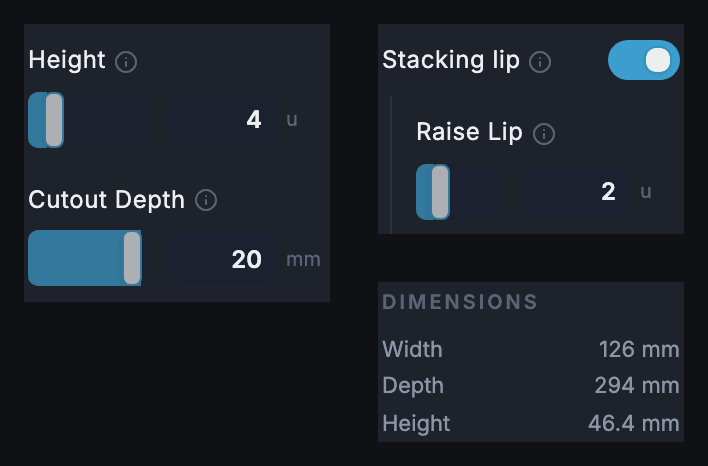
The Dimensions panel below the settings shows the bin's full height, including the raised lip. That is 7 mm for each unit of Height and Raise Lip, plus 4.4 mm of stacking lip. A 4u bin with 2u of Raise Lip is 46.4 mm tall. Check the stack still fits your drawer, with your baseplate under it.
4. Stack a bin the same size
The bin on top needs the same Grid Width and Grid Depth, so its feet sit in the lip all the way round. A smaller bin is not held by the lip and can drop into the open space inside the raised wall.
Common mistakes
- Turning off Stacking lip. Raise Lip resets to 0 and disappears. Turn the lip back on and set it again.
- Raising Height on its own. Pockets are cut down from the top face. A taller bin with the same Cutout Depth leaves the tool sticking out just as far.
- Counting the stacking lip as room. With Raise Lip at 0 the bin on top rests on the top face, and its feet fill the lip.
- Measuring from the top of the lip. The clear space in the table starts at the top face, where the pockets begin.
Reference
More guides
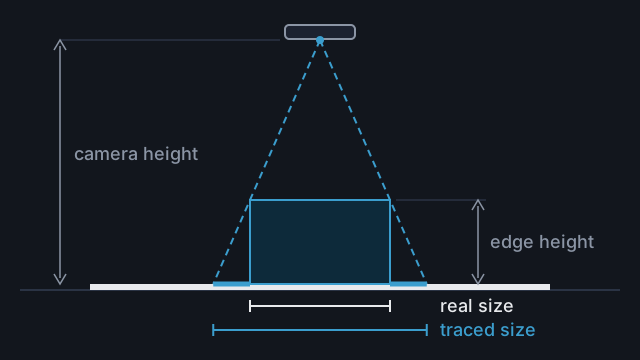
Trace tall or thick objects at the right size
Why tall objects trace too large, and how to shoot, measure and set the size so the pocket fits.
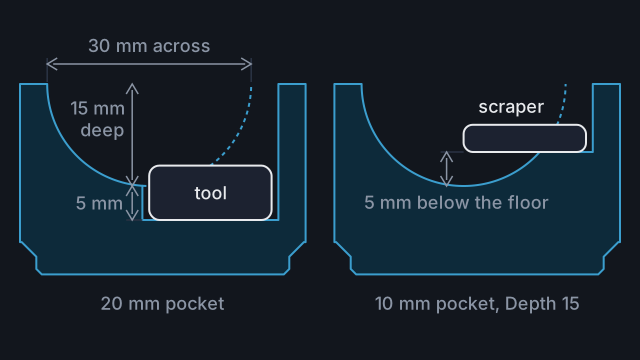
Add finger holes so tools lift out
Put a finger hole on the edge of a tool's outline, make it deep enough to reach the tool, and keep it clear of the walls.
Plan a whole drawer
Measure a drawer, make a project and its bins, then lay them out in a drawer plan and check the fit in 3D before you print.